

9 Ways Cable Clutter Reduces Productivity in the Office
9 Ways Cable Clutter Reduces Productivity in the Office


9 Ways Cable Clutter Reduces
Productivity in the Office
Cable clutter in the workplace can have serious consequences, including reducing efficiency and creating safety hazards. Unmanaged wires can cause employees to lose time and focus. They can also threaten the performance of critical equipment. Explore nine ways cable clutter reduces productivity in the office and practical solutions for organizing workspaces.
Wastes Time in Searching for Connections
Tangled cables can be a nightmare when you need to locate the right connection in a hurry. Whether you’re trying to plug in a device, troubleshoot an issue, or switch out equipment, untangling knots or tracing a cable’s unclear path wastes valuable time. These delays frustrate employees trying to meet tight deadlines.
For offices, conference rooms, and shared spaces with multiple devices, the problem becomes exponentially worse. Wasteful tangles reduce efficiency and lead to confusion. Over time, the small moments spent managing these tangles can accumulate into hours of lost productivity that could have been dedicated to more important tasks.
Creates Safety Hazards
Unorganized cables create hidden dangers in the office. One accidental trip over a loose cable can lead to a fall, resulting in injuries that affect the employee’s health and well-being and disrupt the office’s workflow.
When cords are jumbled together, even a slight tug can have unintended consequences. Loose cables are more likely to pull connected devices off surfaces or disrupt critical connections, damaging valuable equipment and creating safety risks for employees. Neat cable management can significantly reduce these hazards.
Offices can organize cables in the following ways:
• Use cable clips or ties to keep cords bundled and out of the walking path.
• Cover cables that cannot be removed from walking paths with cord covers to minimize trip hazards.
• Secure loose cables under desks or along walls to prevent accidental trips.
• Label each cable to avoid confusion and unnecessary tugging during adjustments.
• Install cable trays or conduits to route wires neatly and safely out of sight.
• Regularly inspect and reposition cables that may have shifted into unsafe areas.
Risks Equipment Damage
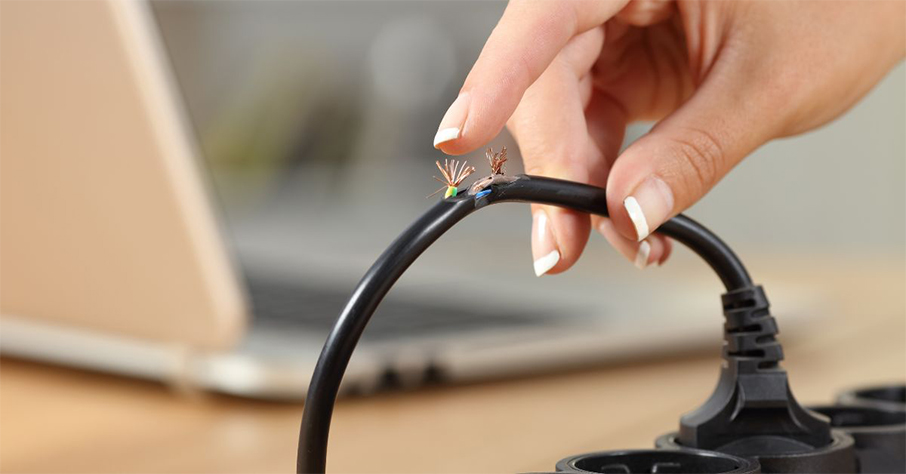
Poorly managed cables can lead to bending, twisting, or fraying, which puts equipment at risk of malfunction or failure. These issues make devices like computers, printers, and monitors less efficient, leading to costly replacements or repairs. Additionally, tangled cables can make it difficult to identify specific connections, delaying troubleshooting efforts.
Stylish furniture hardware organizes and secures cables in convenient places. You can attach cables under desks, along the edges of tables, or behind monitor stands to keep them out of the way. Simple tools like cable ties and wire managers safeguard your equipment, keeping wires intact and functional.
Hampers Desk Organization
A messy web of cables can ruin an otherwise tidy workstation. Cables that occupy precious desk space or legroom make it harder to establish a clean, organized workspace. Employees may find it challenging to keep important papers, tools, or even their computers in optimal positions.
This clutter often snowballs into further disarray. Visual untidiness can contribute to a disorganized mindset, where employees have trouble maintaining focus and discipline in their work. Fixing cable clutter restores order and promotes a clean, focused work environment.
Slows Equipment Replacement
Businesses periodically replace electronic equipment to maintain efficiency and ensure compatibility with the latest technologies. Upgrading prevents costly downtime caused by outdated or malfunctioning tools and supports consistent, high-quality output.
When cables are tangled, disconnecting one device without pulling on others becomes nearly impossible. This complexity makes replacing or upgrading equipment a frustrating, time-consuming effort. Teams may waste valuable moments untangling wires instead of getting new devices up and running
Creates Difficult Maintenance Scenarios
Tech teams also access cables for reasons other than equipment upgrades. They may handle cables for maintenance, troubleshooting, or reconfiguring setups. Tangled cables increase the time and effort required to diagnose and resolve technical issues. Technicians must first wrestle with separating wires or tracing unclear paths before they can even begin troubleshooting.
This delay decreases system uptime and impacts your team’s ability to stay productive. A clear, organized cable setup allows IT professionals to be more effective, minimizing downtime and interruptions to operations.

Distracts Employees
Cable clutter reduces office productivity by distracting employees, even when workers are not actively managing cables. A chaotic workspace filled with disorganized wires acts like visual noise, creating subconscious irritation that makes it harder to focus.
Try these tips for creating a cleaner, more organized work layout that reduces distractions:
• Declutter by removing unused items and organizing essential tools for easy access.
• Use cable management solutions, like ties or desk grommets, to keep wires neat and out of sight.
• Arrange furniture and workstations to minimize visual distractions and optimize walking pathways.
• Use adequate storage tools, such as shelves or drawers, to keep surfaces clean and organized.
• Regularly clean and tidy the area to maintain a consistent, distraction-free environment.
• Designate zones for specific tasks, like collaboration areas or quiet spaces, to support focus and efficient workflow.
• Add ergonomic furniture and proper lighting to create a comfortable, productive atmosphere.
Decreases Professional Appearance
An office filled with messy cables doesn’t exactly inspire confidence when clients or visitors drop by. Clutter suggests a lack of attention to detail and can leave a negative impression, particularly for prospective customers.
Internally, clutter can affect employee morale. A visually chaotic environment doesn’t foster pride in the workspace, which may lead to reduced care and efficiency over time. Tidy cables, by contrast, contribute to a polished, professional image that benefits clients and employees.
Reduces Airflow Around Devices
Clumped cables crowding around electronics can restrict airflow and create overheating issues. When laptops, routers, and monitors can’t cool down effectively, their performance suffers, causing delays in completing essential tasks. Overheating can lead to long-term damage that reduces the lifespan of critical equipment.
Excessive heat buildup can damage wire insulation and increase the risk of sparks or electrical fires, especially in high-energy environments. To avoid this problem, organize cables using tools like cable ties and trays and position them so that air can circulate freely.
Cable management is crucial for maintaining a safe, efficient, and visually appealing workspace. Cluttered cords can lead to wasted time, safety hazards, and reduced equipment functionality, all of which drain productivity and resources. By using simple cable management tools and strategies, you can create a cleaner, more organized environment.